- Login
-
Contact
-

Service-Center
- Contact Form
-
- EN
-

-
 Australia
-
 Austria
-
 Belgium
-
 Bulgaria
-
 Canada
-
 Chile
-
 Croatia
-
 Czech Republic
-
 Denmark
-
 Estonia
-
 Finland
-
 France
-
 Germany
-
 Greece
-
 Hungary
-
 Italy
-
 Latvia
-
 Lithuania
-
 Netherlands
-
 Norway
-
 Oman
-
 Peru
-
 Poland
-
 Portugal
-
 Qatar
-
 Romania
-
 Saudi Arabia
-
 Serbia
-
 Slovakia
-
 Slovenia
-
 Spain
-
 Sweden
-
 Switzerland
-
 Türkiye
-
 Ukraine
-
 United Arab Emirates
-
 United Kingdom
-
 United States
-

- Home
- Upload Material List

Upload Material List
If you wish to upload a material list into the online shop, you can do this very easily. You will save a lot of time, as you can add all items to your shopping cart or a saved list with one click of a button.
How does it work?
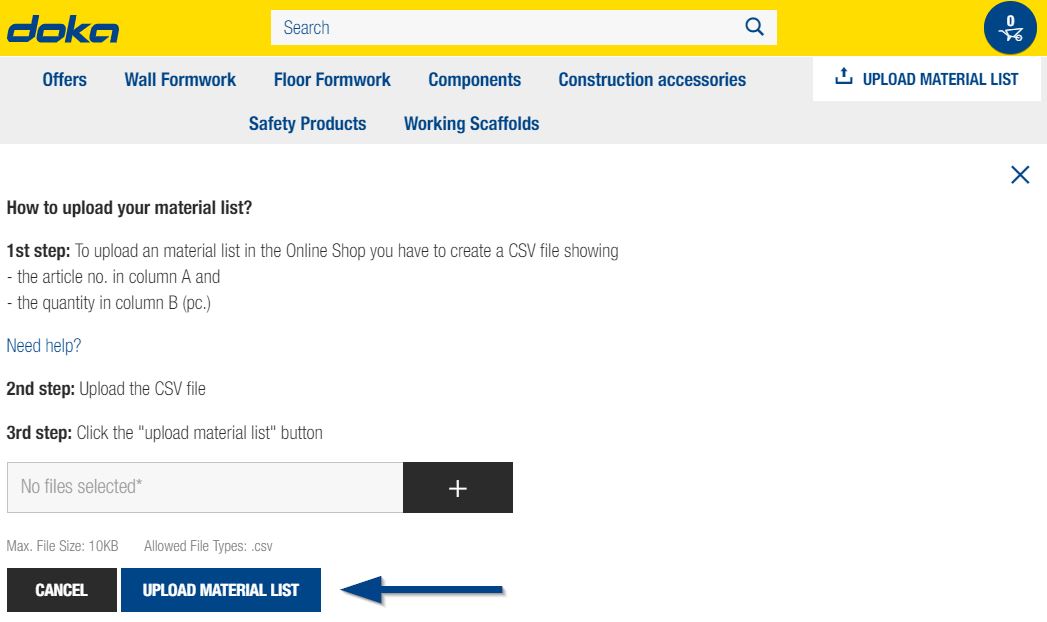
1st step: Create Material List
The material list, in a .csv file format, should consist of two columns: the article number in column A, the required quantity in column B. The quantity has to be entered as per piece.
You can use programs like Microsoft Excel to create a .csv file.
An example list could look like this:
189011000,100
187211000,250
586270000,160
Attention: Please do not use any headers above the columns.
How can I save an Excel list as .csv?
In order to save an Excel list as a csv-file take the following steps:
- In Microsoft Excel: click "File" and "Save as"
- Select a folder to save it in
- Before finally clicking "Save", the file format has to be changed to .csv
You can find detailed instructions here.
The following example file in csv-format can be opened in Excel and saved again as .csv: Download example file
2nd step: Upload Material List
The button to upload the material list is below the shopping cart symbol. Click on it to open a menu. There you can select your file with the "+" button.

3rd step: Click the upload button
Click on the blue button "Upload material list".
4th Step: The products are displayed in the required quantity
The products from the material list are then listed on one page. With only one click, the entire material list can be added to your saved material list, or the shopping cart. It is also possible to change the quantity or the material condition (new, used) if available.
If items from the material list are not available in the Online Shop, you will see detailed information after the upload. You can inquire about these items separately via a contact link.
Consent for Cookies
You can find more information on the use of cookies and opt-out options in our privacy statement.
You can amend your cookie settings at any time using the cookie settings link in the page footer. Please refer to our extensive privacy statement for more information.